Your phone
United States, Canada or Australia. Save the country and number in Voice setup.
Outbound calling & texting / Voice
An outbound call-bridge dialer and texting dashboard for your own Twilio numbers. Call customers from the business number they recognize, while you talk on your everyday phone.
$7/month or $59/year · Twilio fees separate
First create your account, then choose a plan and pay securely with Stripe.
$7 per month or $59 per year. Your own Twilio account is required, and Twilio fees are separate. Put it to work for your business. If it’s not for you, request a full refund of your first subscription payment within 14 days, no questions asked. Payment is collected upfront; subscriptions renew automatically until canceled. The guarantee covers your Voice subscription, not Twilio charges.
Create your Voice accountIllustrative preview · Fictional conversations
Less switching. More following up.
Choose a Twilio number and see its recent activity. Send a text, read a reply, or start a call bridge when a conversation needs more than a message.
Texting requires an SMS-capable number and any required Twilio registration. Use Refresh to retrieve the latest activity.
For Twilio account holders in three countries
Live in Australia, Canada or the United States? Bring your own Twilio account and manage your business conversations in one place. For outbound calls, Voice rings your saved bridge phone first; answer and press 1 to connect.
United States, Canada or Australia. Save the country and number in Voice setup.
Choose US, Canadian or Australian business and customer numbers. Call locally or across supported countries, subject to Twilio permissions and carrier rules. Texting needs an SMS-capable number.
Enable Voice permissions for both call destinations and Messaging permissions for text destinations. Twilio bills usage at the applicable rates.
Canada and Australia are a pilot. Real international carrier testing is still pending.
See the international setup checklistA familiar phone call, with a better first impression
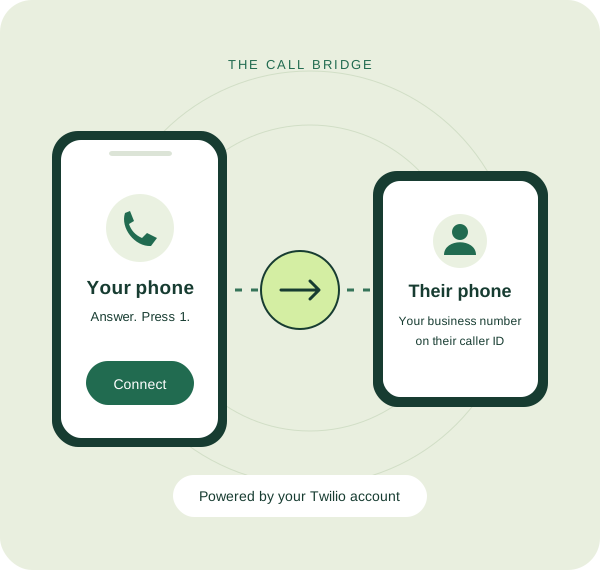
Voice connects your everyday phone to your customer through a call bridge. Your phone rings first. Answer and press 1, then we call your customer. They see your selected Twilio business number, not your personal number.
Pick a voice-enabled US, Canadian or Australian number from your connected Twilio account and enter the person you want to call.
We call your saved bridge phone first. Answer and press 1 when you’re ready to connect.
We dial the recipient using your selected Twilio number as caller ID. The call is available in your call history afterward.
Put your business number to work
Call a new prospect from the business number they saw on your website, even when your everyday phone has an out-of-state area code.
Send a quick text to agree on a time and keep the reply in the same business conversation.
Give a quick arrival update from your business number so customers know who is contacting them.
Pick up an earlier conversation by text, then switch to a call when it’s easier to talk through the details.
Call or text a contractor from your selected Twilio number without creating a customer record or job first.
Switch between your Twilio numbers and see the calls and messages associated with each line.
Listen again. Keep the details.
Revisit what was discussed without relying on memory. Find available recordings for your selected business number, with call dates, times and phone numbers.
Recording is optional and requires consent. Calls without a recording have no audio to play. Twilio recording fees are separate.
Explore the recordings demoHouse washing appointment confirmed
Fictional conversation using Descript AI voices. This is the same sample featured in our demo. Audio plays only when you choose Play.
Keep good conversations going
An estimate needs a check-in. An appointment needs confirming. A happy customer is ready for a review request. Save what you want to say while it’s fresh, so the next step is ready when you return.
Type your message in the conversation, choose Save follow-up, and set a due date. Your draft is ready for later.
Your Follow-ups tab separates upcoming, past-due and completed reminders. See the contact, full draft and days remaining at a glance.
Open the draft and conversation history together without leaving Follow-ups. Make any changes, confirm texting consent and send. Then mark it complete.
You stay in control. Follow-ups are manual dashboard reminders, not automatic texts or reminder notifications. Nothing is sent until you choose Send.
Try a follow-up in the demoYour words, ready when you need them
Save the messages you use often, like appointment confirmations, arrival updates and review requests. Type a slash and start spelling your shortcut to see a suggestion. Press Tab to insert it, then make it your own.
You review the message, confirm the recipient’s consent and choose Send. Shortcuts never send a text automatically.
Explore the texting demoYou’re confirmed for tomorrow at 2 PM. We’ll text you when we’re on our way.
Type /confirm, then press Tab to insert your saved response. Edit it for the customer before you send.
Nothing is sent by this illustration.Your account. Your numbers.
Voice setup walks you through the connection and the permissions your Twilio API key needs.
Get started with VoiceGood to know
Yes. Voice is for Twilio account holders in Australia, Canada and the United States. Voice accepts business numbers, bridge phones and customer numbers in all three countries. For texting, your business number must support SMS. Enable destination countries separately in Twilio Voice and Messaging geographic permissions. Canada and Australia are a pilot pending real carrier testing; setup includes instructions. Your Twilio account pays for usage.
Voice is an outbound call-bridge dialer and texting dashboard. Connecting it does not automatically replace your existing incoming-call forwarding, greeting or voicemail setup in Twilio.
Yes. You connect your own Twilio account with the credentials and permissions explained in Voice setup. Lead to Crew provides the dashboard; your Twilio account provides the phone numbers, calls and messages.
No. You purchase and manage your numbers in Twilio. For calls, choose a voice-enabled US, Canadian or Australian number in your connected account. Texting also requires messaging capability and the applicable Twilio messaging registration.
The recipient sees the Twilio number you selected as caller ID. Your personal phone is the first side of the bridge, where you answer and press 1.
Yes. Use the number dropdown to switch numbers and see the recent calls and text conversations for that number. You can save a default number and a default bridge phone in setup.
No. The dashboard starts a phone-to-phone bridge. You speak on your own phone, so you don’t need a browser microphone or a headset to make the call.
Recording is optional. Before starting a recorded call, select recording and confirm that you have obtained the required consent. Available recordings can be played back and downloaded.
Yes. Save a follow-up draft with a due date, then return to the Follow-ups tab. Open the contact’s conversation, review the draft, confirm consent and send it yourself. Reminders never send messages automatically.
Create your own reusable responses and give them shortcuts. Type / and the shortcut in the message box, then press Tab to insert the highlighted response. You can edit the message before sending it.
Twilio bills usage to your own Twilio account. A bridged call has two call legs; messaging and optional recording can also incur Twilio charges. Twilio usage is separate from any Lead to Crew service fee.
No. Voice works on its own. You do not need an organization workspace, customer records or jobs. To get started, create your Voice account, then choose a monthly or annual plan. Already have Voice? Sign in to continue.
Lead to Crew Voice
Own Twilio account required · US, Canadian and Australian numbers